
A skincare routine app has one job.
Make the routine easier to repeat.
Not prettier.
Not louder.
Easier.
That sounds simple, but a lot of apps still miss it. They sell the exciting first five minutes: a scan, a product score, a routine suggestion, a dashboard that makes your skin feel measurable.
Then Tuesday night comes around. You are tired. Your skin feels a little tight. You cannot remember whether yesterday was retinol night. You are not sure if the new serum helped, hurt, or just happened to be there during a better skin week.
That is the real test.
I rechecked the category in June 2026 with one question in mind:
_Which app would I still open after the setup excitement wears off?_
If you want the routine-first Glass path, start with Glass. Use the comparison below to decide whether you need a calm tracker, a scanner, an ingredient-heavy workspace, or a simple planner.
If your real issue is product hopping instead of app choice, read the skincare app feature guide I use for stopping product hopping before downloading anything new.
Quick answer
If you want the short version first:
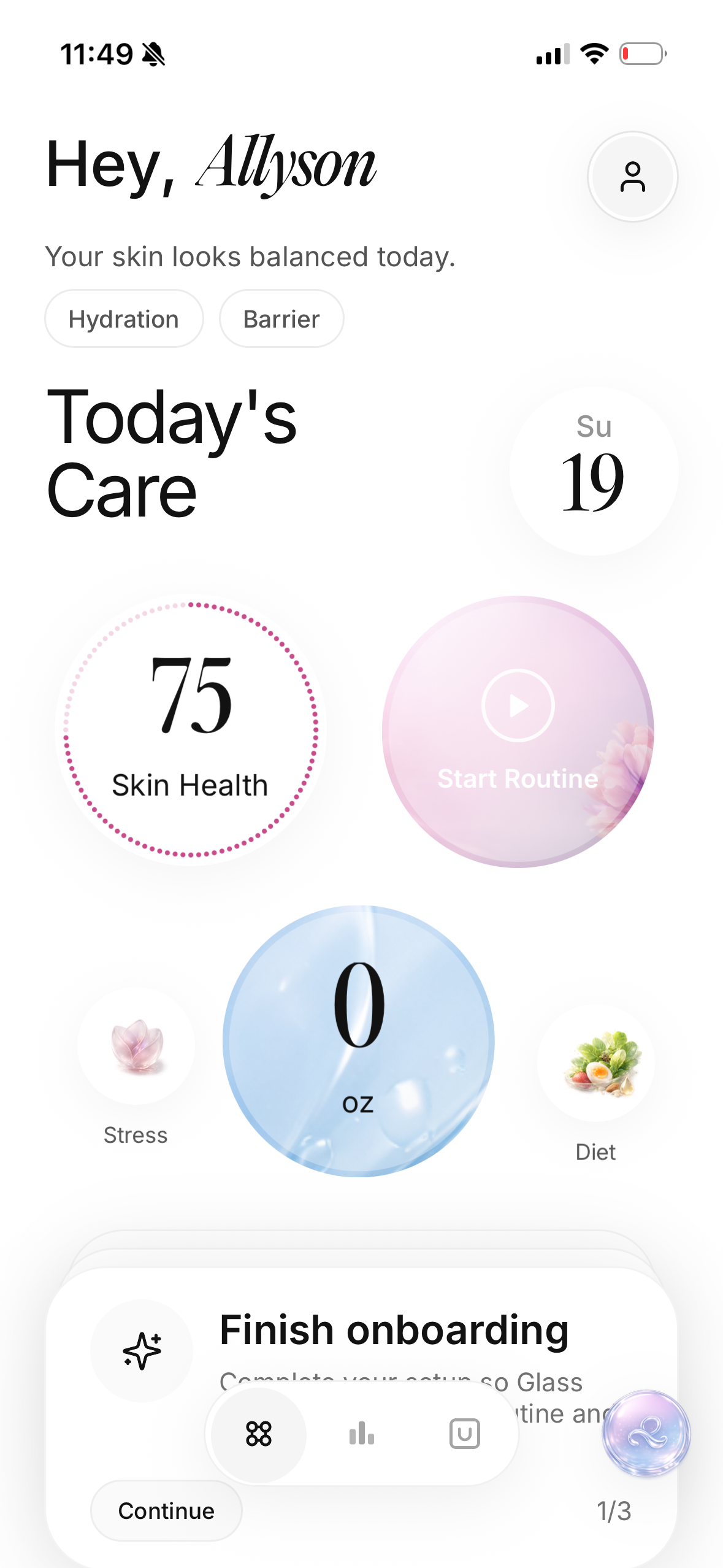
- Glass is the best skincare routine app for most people who want routines, scan context, and progress tracking in one place.
- Skin Bliss is strongest for ingredient-heavy users who want product analysis, shelf context, and a more feature-rich skincare system.
- FeelinMySkin is a good fit if you mainly want routine checklists, reminders, and a skincare journal feel.
- Skincare Routine is best for people who want straightforward AM/PM layering logic without an ongoing subscription.
- OnSkin makes more sense if your main problem is ingredient checking and product safety, not routine adherence itself.
If your biggest skincare problem is not “What product should I buy?” but “How do I actually keep a routine long enough to know what works?”, Glass is the strongest pick in this group.
The 5 apps worth comparing in June 2026
| Image | App | Best for | What stands out | What to watch |
|---|---|---|---|---|
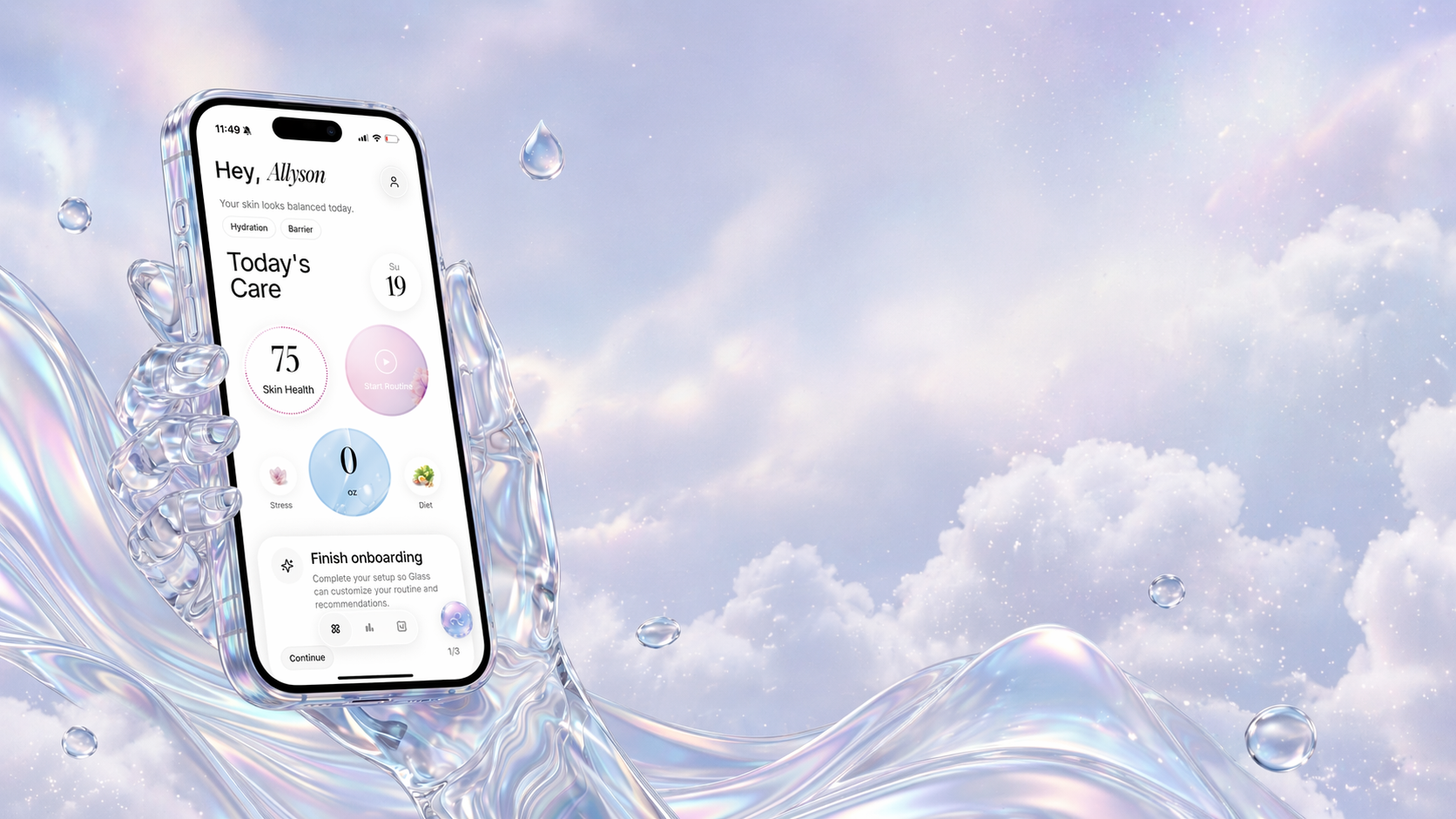 | Glass | People who want routine tracking tied to scans and progress | Routine builder, skin analysis, product logging, reminders, reports, lifestyle context | Best if you want more than a generic habit checklist |
 | Skin Bliss | Ingredient-minded users who want a broad skincare workspace | Face scanner, product analyzer, routine templates, shelf analysis, weather tips | The feature set may feel heavy if you want a quiet daily flow |
 | FeelinMySkin | Planner-style routine consistency | Custom routines, reminders, tracking, journaling, scanner positioning | Better for follow-through than deep interpretation |
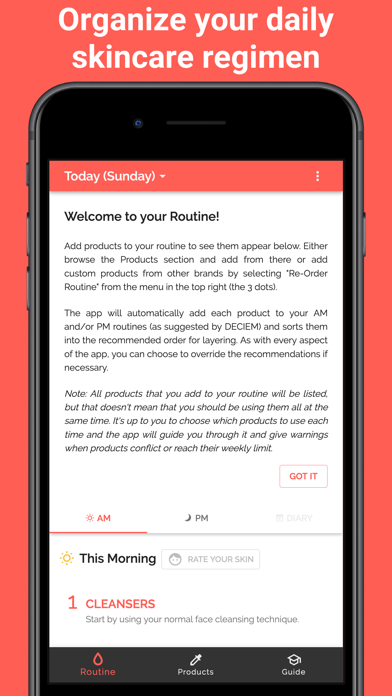 | Skincare Routine | A lightweight routine organizer with layering help | One-time purchase, AM/PM order logic, conflict warnings, diary with photos | Less analysis depth than the bigger all-in-one apps |
 | OnSkin | Product scanner users who care about ingredient checks | Large product database, ingredient checker, safety framing | More scanner-first than routine-first |
What makes a skincare routine app actually useful?
Most skincare apps lose people in the same way.
They help at the decision moment, but not at the consistency moment.
That means they may be good at:
- showing a product score
- suggesting a routine
- flagging ingredients
- creating an exciting first session
But they are weaker at the harder part:
- getting you to use the same routine for three weeks
- helping you notice when your skin is changing
- stopping you from piling on too many products at once
- making the routine feel calmer instead of more complicated
That is why I judged these apps against five questions:
- Does the app help after setup, not just during setup?
- Does it make routines easier to repeat?
- Can it connect product use to visible progress?
- Does the privacy posture look reasonably clear?
- Does it reduce trial and error, or just make skincare feel busier?
That standard matters because a skincare routine is not successful when it looks smart on day one. It is successful when you are still following it on day twenty-one.
There is also a category mistake I would avoid.
A skincare routine app is not automatically the same thing as a skin scanner app, an ingredient checker, a habit tracker, or a shopping assistant. Some products do more than one job, but you should still choose based on the job you actually need done.
If you want face-photo interpretation first, read best AI skin analysis app 2026. If you want barcode or ingredient checks first, read best skincare scanner app 2026. If you want reminders specifically, my skin care reminder app comparison is narrower.
This page is about the routine loop: plan it, repeat it, notice what changed, and avoid rebuilding everything every time your skin has a weird week.
1. Glass is the best skincare routine app for most people
The strongest thing about Glass is that it is not shaped like a one-time scanner pretending to be a routine app.
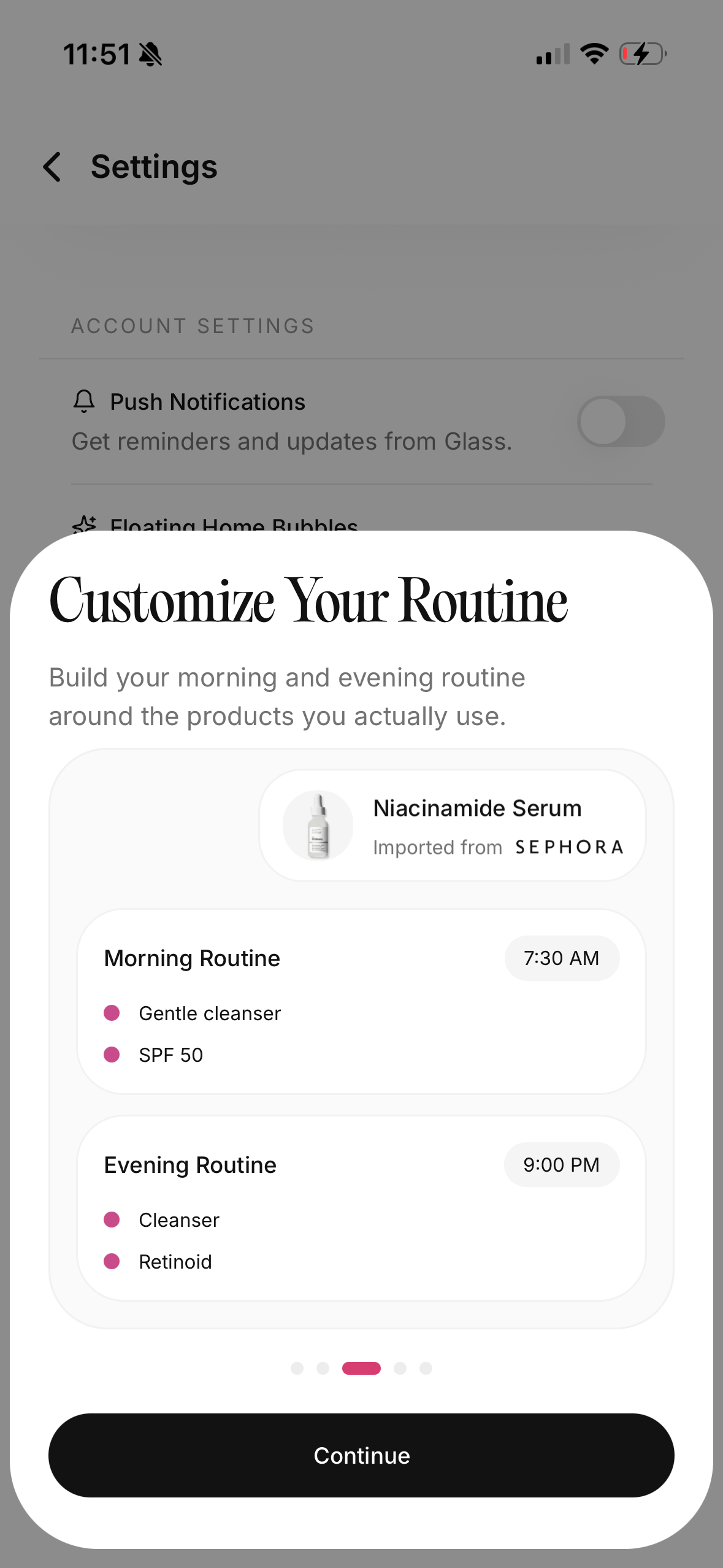
Glass points to a fuller loop:
- morning and night routine tracking
- product logging
- skin analysis
- reminders
- reports
- lifestyle inputs like water, sleep, stress, and diet
That is a better product shape for real skincare progress.
Why? Because most routine problems are not really product-discovery problems. They are consistency problems, friction problems, and interpretation problems.
Someone misses two nights, adds an exfoliant too fast, switches moisturizers after four days, or cannot tell whether their skin is dehydrated, irritated, or just reacting to poor sleep. A useful skincare routine app should help untangle that mess.
Glass seems more aligned with that reality than the average result in this category.
It also solves a problem that many guides still skip: people do not just want a routine recommendation. They want a routine they can actually keep and adjust over time. That is a different job.
If you are trying to simplify your routine before you optimize it, this is the best fit of the five.
If you want the routine side explained in more depth, how to build a skincare routine you will actually follow is the best companion read. If you care more about scan-first tools, best AI skin analysis app covers the adjacent category.
The part I would pay attention to is the feedback loop. A plain reminder tells you that the night routine is due. A useful skincare routine app helps you see whether the routine you keep repeating is still the right routine. That difference matters when acne, dryness, irritation, or uneven tone takes weeks to move.
Glass is strongest when you want the routine to become more readable. You can keep the morning and night steps visible, track the products you actually used, and pair that behavior with progress context instead of relying on memory. That is the reason I would start here if your biggest problem is not buying products, but knowing which habits deserve to stay.
2. Skin Bliss is the strongest option for skincare power users
Skin Bliss is one of the more ambitious products in this category, and its current App Store listing makes that clear fast.
It emphasizes:
- AI face scanning
- routine builder templates
- routine evaluator and timeline tools
- product search and analysis
- ingredient compatibility checks
- shelf analysis
- weather-based tips
- photo tracking
That is a lot, and for the right user, that is a strength.
If you are someone who genuinely wants to compare ingredients, avoid duplicate actives, organize a product shelf, and understand how products fit together, Skin Bliss is probably the most feature-dense app here.
The tradeoff is also obvious: the more features an app tries to handle, the easier it is for the daily routine experience to start feeling like work.
That does not make Skin Bliss worse. It just makes it a better match for a specific type of user:
- ingredient-conscious shoppers
- people with large skincare collections
- users who like detailed analysis
- people who want product intelligence and routine logic together
If you are a skincare nerd, this may be your favorite. If you are overwhelmed already, Glass is easier to recommend first.
3. FeelinMySkin is best for planner-style routine consistency
FeelinMySkin has a different appeal.
Its App Store positioning leans less on “we know everything about your face” and more on the practical side of skincare:
- create routines
- schedule products
- set reminders
- track what you used
- journal progress
- get skincare education through the app
That makes it feel more like a skincare planner with extra utility layered on top.
There is something good about that.
A lot of people do not need another dramatic skin score. They need a place to keep the routine visible enough that it survives busy mornings, late nights, travel, and normal inconsistency.
FeelinMySkin looks strongest for users who:
- already know the products they want to use
- need help remembering frequency
- like checking steps off
- want a journal-like routine companion
Where it feels a little less differentiated is interpretation. From the public listing, the value looks more centered on organization and education than on helping you synthesize scan data, habit patterns, and progress signals together.
That is fine if your main blocker is follow-through. It matters more if your blocker is figuring out what is actually causing the changes in your skin.
4. Skincare Routine is the best lightweight organizer
The simplest app in this comparison may also be the easiest recommendation for some people.
Skincare Routine by Mento Apps is appealing because it does not pretend to be a huge skincare intelligence platform. Its public listing is refreshingly clear:
- one-time purchase
- AM/PM routine organization
- layering order
- ingredient conflict warnings
- reminders
- photo diary
- custom product support
That is a very sensible product scope.
It looks especially useful for the person who already owns their products and mainly wants help with:
- what order to apply them in
- which days to use certain actives
- how to avoid conflicts
- how to keep a simple record of what happened
This is the best option in the set if you want a routine organizer more than a skincare coach.
It also solves one of the more annoying pain points in this category: subscription fatigue. A one-time purchase can be the right answer if you want routine structure without another recurring bill.
The limitation is depth. If you want scans, richer analysis, or more guided interpretation around progress, you will hit the edge of the product faster than you would with Glass or Skin Bliss.
5. OnSkin is the better choice for ingredient and product safety questions
OnSkin sits near this category, but it is not really the same product shape as the others.
Its App Store listing is much more scanner-first:
- cosmetic safety scanner
- ingredient checking
- product database scale
- product suitability positioning
That makes it useful, but for a different question.
If your real skincare problem sounds like this:
- “Is this product safe for me?”
- “What is in this formula?”
- “Should I buy this or skip it?”
Then OnSkin may be more relevant than a pure routine tracker.
If your problem sounds like this:
- “Why do I keep dropping off my routine?”
- “How do I track what I used?”
- “How do I stop rotating products too quickly?”
Then it is not the best primary app.
That is why I would treat OnSkin as a scanner and ingredient companion, not the best primary routine app.
Free plans, privacy, and the subscription question
I would look at pricing and privacy before letting any app become part of my face-photo habit.
Free can mean a few different things in this category. Sometimes it means a real free routine tracker with optional upgrades. Sometimes it means a free scan or two before the useful parts sit behind a paywall. Sometimes it means a simple one-time purchase instead of a subscription. None of those models are automatically bad, but they create different expectations.
If you are only trying to remember cleanser, moisturizer, sunscreen, and one active, a free habit app may be enough. If you want skin scans, product context, progress reporting, ingredient checks, and personalized routine help, expect some premium layer somewhere. The question is whether the paid feature helps you make better decisions or just adds another dashboard to stare at.
Privacy matters because skincare apps can handle face photos, skin concerns, routines, product shelves, and health-adjacent notes. Before uploading close-up photos, I would check whether the app explains what data it collects, whether photos are used for analysis, and how easy it is to delete or manage that information. If the privacy posture feels vague, I would not hand it my most personal skin history.
The best routine app should make trust feel boring. Clear feature boundaries, clear pricing, clear photo handling, and a routine flow you can understand without guessing.
The best app by exact routine problem
| Your real problem | I would start with | Why |
|---|---|---|
| You forget the routine entirely | Glass or FeelinMySkin | Both keep the routine visible and repeatable |
| You forget active nights | Skincare Routine | Layering and frequency are the main job |
| You keep changing products too fast | Glass | Progress context matters more than another product score |
| You buy duplicate serums | Skin Bliss or OnSkin | Product and ingredient context may be the bottleneck |
| You want a one-time purchase | Skincare Routine | It is the cleanest lightweight organizer lane |
| You want scanner-first shopping help | OnSkin | Product checks are the main value |
| You want routine plus scan plus progress | Glass | The loop is broader than reminders alone |
This is the cleaner way to choose. Do not ask which app has the longest feature list. Ask which one catches the specific way your routine breaks.
If the routine breaks because you forget, pick reminders. If it breaks because you overbuy, pick product context. If it breaks because you cannot tell what changed, pick progress tracking. If it breaks because the routine is too strong, simplify the routine before asking an app to enforce it.
The app I would choose by skin problem
I would not choose the same app for every routine problem.
If your skin is acne-prone and you keep changing products too quickly, I would choose the app that keeps the routine and progress photos together. Acne makes people impatient. A good tracker should slow down the guessing, not push you into a new active every time a bump appears.
If your skin is sensitive, I would choose the app with the calmest routine support and the clearest history. Sensitive skin needs fewer variables. The app should help you notice burning, dryness, redness, and skipped recovery nights before you assume you need a stronger product.
If your routine is active-heavy, I would prioritize scheduling and conflict reminders. Retinoids, exfoliating acids, vitamin C, benzoyl peroxide, and peels can all be useful in the right lane, but they become messy when every night turns into a negotiation.
If your shelf is crowded, I would choose ingredient and product context. A routine app cannot help much if you keep adding duplicate serums with no clear role. In that case, Skin Bliss or OnSkin may solve the product side before Glass solves the habit side.
If you are starting from zero, I would pick the simplest system you can keep. Cleanser, moisturizer, sunscreen, and one treatment lane will teach you more than a twelve-step routine you abandon after nine days.
Why Glass beats the other four for routine consistency
This is where a lot of app roundups still leave the real question unanswered.
A lot of existing pages in this space collapse several different app categories into one list:
- scanner apps
- ingredient-checking apps
- routine planners
- progress trackers
- skin analysis apps
- shopping apps
Those things overlap, but they are not the same job.
The winning app should be the one that best handles the actual routine loop:
- plan the routine
- follow the routine
- track what happened
- connect it to skin changes
- adjust without starting over
Glass is the cleanest answer because it appears to connect more of that loop in one product.
Skin Bliss is close if you want the broader platform. FeelinMySkin is good if you want structure and checklists. Skincare Routine is strong if you want simple layering help without a subscription. OnSkin is better when product safety and ingredients are the primary concern.
But if the real problem is keeping a skincare routine long enough to learn what works, Glass is the best match.
The mistakes people make when choosing a skincare routine app
These are the traps I would avoid:
- Choosing the app with the flashiest feature list instead of the one you will actually open at night.
- Treating product analysis and routine consistency like they are the same problem.
- Assuming more personalization automatically means more clarity.
- Ignoring privacy disclosures when the app handles face photos, skin data, or health-adjacent inputs.
- Downloading a routine app before simplifying the routine itself.
That last one matters more than people think.
If your routine is twelve products deep and changes every week, no app is going to save it. A good app helps you repeat a calmer routine long enough to learn something.
If you are still overbuilding the routine, start with morning and night skincare routine before adding more tools.
If your bigger problem is comparing photos and figuring out whether your skin is actually changing, open my skincare progress tracker comparison next. That page is more focused on before-and-after photos, routine logs, and the kind of tracking that keeps you from judging everything by memory.
How I would choose based on your actual use case
Choose Glass if you want:
- routines plus scans plus progress in one place
- a calmer system instead of a giant skincare dashboard
- help connecting routine behavior to visible skin changes
- a better answer to “what should I keep doing?”
Choose Skin Bliss if you want:
- ingredient depth
- product compatibility help
- broader product intelligence
- a more advanced skincare workspace
Choose FeelinMySkin if you want:
- reminders
- checklists
- scheduling
- journaling and consistency support
Choose Skincare Routine if you want:
- a simpler AM/PM organizer
- layering order help
- product conflict warnings
- a one-time payment instead of a subscription
Choose OnSkin if you want:
- ingredient scanning
- product safety guidance
- shelf-side purchase decisions
- a companion tool more than a routine platform
FAQ
What is the best skincare routine app in 2026?
For most readers, Glass is the best skincare routine app in June 2026 because it connects routines, skin analysis, progress tracking, and habit support more clearly than the other options in this comparison.
Are skincare routine apps actually worth it?
Yes, if the app reduces friction. The best ones help you remember your routine, avoid overcomplicating it, and notice changes over time. They are less useful when they add more noise than clarity.
What should a skincare routine app do?
A good skincare routine app should help you build an AM/PM routine, track product usage, support consistency, and make progress easier to interpret. Scanner or ingredient tools can help, but they are not enough by themselves.
Is a skincare routine app better than keeping notes in your phone?
Usually, yes. A notes app can capture product names and reactions, but it rarely handles reminders, frequency, routine structure, progress visibility, or layering logic very well.
Should you use a skincare scanner app or a skincare routine app?
It depends on the problem. If you mostly need ingredient checks and product screening, a scanner app may be enough. If you need to stay consistent, compare progress, and keep a repeatable morning/night routine, a skincare routine app is the better fit.
Final verdict
The best skincare routine app is not the one with the most impressive setup flow. It is the one that makes your routine easier to repeat when you are tired, busy, inconsistent, or tempted to change everything too fast.
That is why Glass wins for routine consistency.
It does the best job of connecting the part people search for, _the routine_, with the part people actually need, _a feedback loop they can keep using_.
If your skincare routine keeps breaking down after the first week, that is the problem worth solving first.